
OohYeah - Video Chat & Call
VIVI LIMITEDSocial
4.160.00 Reviews
- Version
- 1.0.22
- Installs
- 100.00K
- Age Rating
- Mature 17+
Screenshots
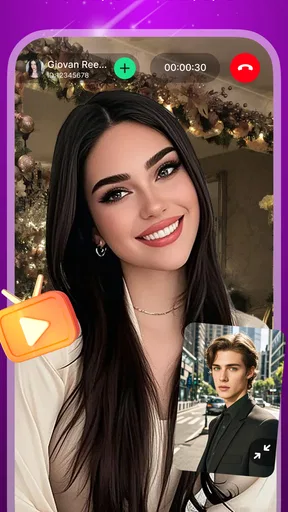
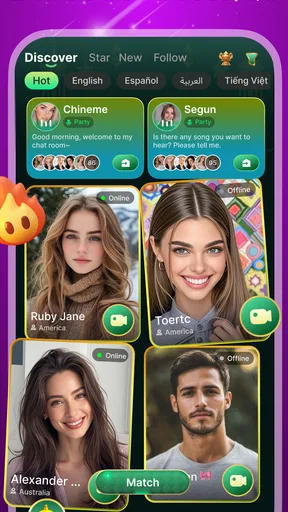
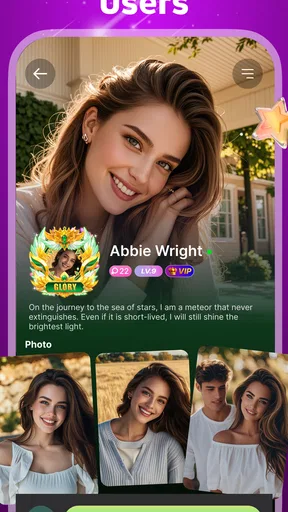
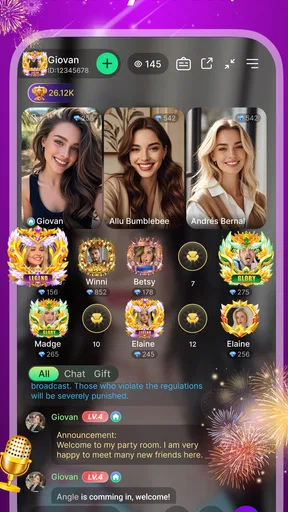
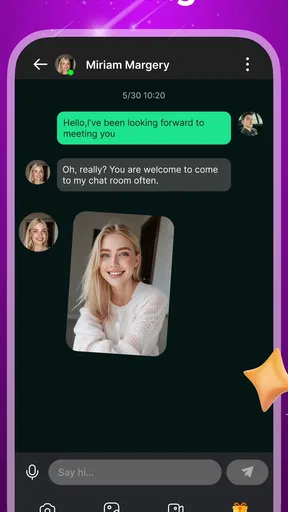
Our Review of OohYeah - Video Chat & Call
 Analysis by Appyee
When I try a new social app, I pay attention to a simple question: can I understand what to do within the first few minutes, or does the interface make me work for it? OohYeah takes a direct approach built around video conversations with people in different parts of the world. That focus makes it easy to understand, but it also means the quality of the experience depends heavily on who you meet, how comfortable you are on camera, and whether the app’s pace suits you.
OohYeah is a free social app from VIVI LIMITED, aimed at mature users and available for Android devices running Android 6.0 or later. It has reached over one hundred thousand installs and holds a 4.1 average from around seven hundred ratings, which suggests a reasonably positive early reception without making the app feel universally proven. The current version is 1.0.22, and the app first appeared on March 6, 2025, so I see it as a relatively young service that may still be finding its best shape.
How OohYeah feels to use in everyday situations
I find OohYeah most useful when I treat it as a deliberate, short social stop rather than something to keep open out of habit. A quick check-in before starting helps me decide whether I have the privacy and attention for a live conversation, and that choice can make the experience feel more comfortable. From there, the bigger question is whether that first-week curiosity turns into a routine worth keeping.
Readability and navigation matter more than decoration
The strongest part of an app built around live video should be getting users from opening the app to a conversation without unnecessary confusion. OohYeah’s identity is clear from the start: this is not a general-purpose timeline, a photo-sharing network, or a messaging archive. Its purpose is live social contact. That narrow focus can be helpful for someone who does not want to learn a large collection of unrelated tools.
I also think this kind of focused design can be useful for people who find crowded social platforms tiring. Conventional networks often mix feeds, stories, reactions, private messages, recommendations, advertisements, and constantly changing tabs. A video-chat app has a different rhythm. You are more likely to make a quick decision: continue toward a call, browse available social possibilities, or leave the app.
That simplicity has a trade-off. A live video service cannot explain every social situation through labels and menus. The moment another person appears, the user has to interpret tone, timing, facial expressions, and conversation flow. Someone who prefers written instructions or time to prepare may find the transition from navigation to live interaction abrupt, even if the controls themselves are easy to understand.
For readability, I would approach OohYeah with the phone’s own display settings already adjusted to your preference. Larger text, stronger contrast, and a comfortable screen brightness can make a noticeable difference in any app that combines small controls with a moving video image. I would not assume that visual simplicity automatically means every control is equally easy to read, especially when the screen is busy with a camera preview and another person’s image.
Video changes the accessibility equation
Video chat offers a kind of immediacy that text-based social apps cannot match. A person can communicate through facial expression, gestures, and voice instead of writing every thought. For users who find typing slow, uncomfortable, or physically demanding, that can be a genuine advantage. A short conversation may feel much less effortful than maintaining a long text exchange.
At the same time, video should not be treated as automatically inclusive. It favors people who are comfortable being seen and heard. Someone with speech differences, hearing loss, anxiety about appearance, limited privacy, or a communication style that needs more time may prefer a text-first service. OohYeah makes the most sense for users who actively want live visual contact rather than for people seeking a quiet, low-pressure way to meet others.
There is also a sensory consideration that is easy to overlook. Moving faces, changing expressions, voice volume, and the pressure to respond immediately can be stimulating. If you are sensitive to visual motion or unpredictable sound, a short first session is wiser than committing to a long call. I would keep the phone at a comfortable distance, lower the volume before connecting, and use headphones only if they do not make speech harder to follow.
For users with motor limitations, the practical issue is not just whether a button can be reached. It is whether the app gives enough time to make a deliberate choice before a conversation changes or ends. Live social tools can be unforgiving when a tap is missed or a gesture is misunderstood. I would use the app when the phone is stable on a stand or table rather than trying to hold it while managing a conversation. That small change reduces hand fatigue and makes it easier to keep the camera at a useful angle.
A realistic use case: a short evening conversation
Imagine coming home after work and wanting human contact without arranging a formal call with someone you already know. You open OohYeah, settle the phone on a stand, check the lighting, and spend a few minutes seeing whether a live conversation feels comfortable. In that situation, the app can fill a gap between passive scrolling and a planned video meeting. There is less preparation than a scheduled call, but more personal connection than reading posts.
That scenario also reveals an important limitation. Unlike a message that can wait until you have the energy to answer, a live interaction asks for attention now. If your household is noisy, your internet connection is unstable, or you are already mentally tired, the same immediacy that makes OohYeah appealing can become a burden. I would treat it as an intentional social activity, not as something to leave running in the background.
A second useful situation is language practice or casual cultural exchange. Speaking with people from other places can expose you to different accents, expressions, and conversational habits. However, the value depends on finding a respectful exchange and being willing to ask for repetition when needed. Users who need captions, written translation, or a slower pace should not choose this app expecting live video alone to solve those communication challenges.
What makes it different from familiar social alternatives
Compared with a conventional social network, OohYeah puts the conversation closer to the center of the experience. There is less reason to spend an hour passively consuming a feed if your goal is direct contact. Compared with a messaging app, it reduces the distance between “meeting someone” and actually speaking with them. Compared with a scheduled video service, it feels more spontaneous and less formal.
Those differences are useful, but they also define who should skip it. If you want a carefully managed circle of friends, a searchable message history, or a predictable appointment-style call, a familiar messaging or video-meeting app will probably be a better fit. If you want to browse public content without interacting, a social feed is more appropriate. OohYeah is for the person who values immediacy and is willing to accept some uncertainty in exchange for it.
The app’s mature audience designation is important here. I would not recommend treating it as a casual children’s social tool or handing it to a younger user simply because video chat seems straightforward. Adults should also remember that a mature rating does not remove the need for personal boundaries. A camera can reveal more than intended, and a conversation can become uncomfortable faster than a text exchange.
Practical habits that improve the experience
My first tip is to prepare the environment before starting rather than trying to fix everything during a call. Face a light source, remove distracting background details, and place the phone where you can see the screen without holding it continuously. This is especially helpful for users with limited hand strength or difficulty making repeated precise movements.
My second tip is to decide on a personal stopping rule. For example, end a conversation when you feel pressured, distracted, or unable to follow what is being said. Live apps can create a false sense that leaving is rude, but accessibility includes emotional control as well as physical access. A service is easier to use when you do not feel trapped by its social momentum.
My third tip is to separate discovery from commitment. You do not need to treat every potential conversation as something that must become a regular connection. A brief exchange can be worthwhile on its own. This mindset is useful for people who experience social fatigue, because it prevents the app from turning a small moment of curiosity into an obligation.
My fourth tip is to use the app when your connection and surroundings are predictable. Video consumes attention even when the controls are simple. If you are traveling, in a crowded public place, or relying on an inconsistent connection, the experience may be frustrating for both sides. A quieter setting also helps people who rely on lip-reading or visual cues, although the app should not be assumed to provide formal communication support.
Where the remaining barriers appear
The biggest barrier is the live format itself. A user may be able to open the app easily but still struggle once the conversation begins. Fast speech, unfamiliar accents, poor lighting, background noise, and the absence of written context can all make a call harder to follow. These are not minor details for someone with hearing, vision, processing, or attention-related needs.
Another barrier is privacy in shared spaces. Not everyone has a private room, a quiet home, or the freedom to speak openly. A person living with family, roommates, or support workers may need to plan carefully before using a camera-based social app. The ability to participate depends partly on the environment, not only on the phone or the application.
There is also a financial boundary to keep in mind. The app is free to download, but in-app purchases range from $2.99 to $99.99 per item. That spread means I would review any purchase screen slowly and avoid assuming that a paid option is necessary for the basic purpose of making social connections. Users who need strict spending control should involve the device’s purchase safeguards before exploring optional items.
The young age of the service creates another practical consideration. OohYeah was released in 2025, and the current version is 1.0.22. That does not tell me whether a particular future update will improve navigation or add more support for different communication needs, so I would keep expectations realistic. Newer apps can feel fresh and focused, but they may also have rough edges that more established alternatives have had longer to address.
Safety and comfort should guide every interaction. Avoid sharing your address, daily routine, financial details, or identifying documents with someone you have just met. If a conversation becomes manipulative, sexual, aggressive, or simply uncomfortable, ending it is a reasonable response. The mature age label makes it particularly important to approach the app as an adult social environment rather than as a protected space.
Who will benefit, and who should choose something else?
I can see OohYeah working well for adults who want spontaneous video contact and do not mind meeting people outside their existing circle. It may also suit users who communicate better through voice and expression than through long written messages. Someone who enjoys brief social encounters, cultural exchange, and the possibility of an unplanned conversation will understand the appeal quickly.
I would be more cautious about recommending it to a person who needs captions, reliable text alternatives, extensive privacy controls, or a slow, predictable communication process. I would also steer away users who are uncomfortable with strangers seeing or hearing them, or who need a platform designed around known contacts. For those needs, a messaging service, scheduled video-call tool, or accessibility-focused communication option may be more suitable.
The choice also depends on your social goal. If you want to maintain relationships you already have, OohYeah is not a replacement for the messaging apps your friends and family already use. If you want a public audience for creative work, a content-sharing platform may offer a clearer path. If you want to meet people through direct conversation and can manage the uncertainty of live interaction, this app is more relevant.
My inclusive verdict after looking beyond the first impression
OohYeah has a clear idea and a useful place in the social category: it brings people toward live video instead of asking them to build a profile through endless scrolling. I like that directness, and I think the app can be enjoyable when used in a quiet setting with realistic expectations. Its international social angle makes short conversations feel more open-ended than a normal call with someone already in your contacts.
Still, the same design choice creates its main weakness. Live video demands visual attention, quick responses, confidence, and a suitable environment. Those demands can exclude people who need more time, written support, stronger control over interaction, or a lower-sensory experience. I would not call the app broadly accessible simply because its purpose is easy to understand.
My recommendation is therefore specific rather than universal: try OohYeah if you are an adult looking for spontaneous video conversations and you are comfortable setting your own boundaries. Start with a short session, prepare your phone position and surroundings, and keep spending optional rather than automatic. If you need dependable captions, text-led communication, known contacts, or carefully scheduled conversations, choose a different kind of social tool.
In my experience, the best way to use OohYeah is as a flexible doorway to brief human contact, not as a complete replacement for every social app. Its free entry point makes experimenting simple, while its video-first design makes personal comfort the deciding factor. For the right user, that focus is refreshing; for someone with specific sensory, motor, communication, or privacy needs, the limitations deserve equal attention before making it part of a daily routine.
Verdict
Strengths of OohYeah - Video Chat & Call
- Quick matching makes it easy to start spontaneous video conversations.
- Simple interface is accessible even for first-time users.
- Supports real-time interaction with people from different countries.
- Useful filters help narrow down potential conversation partners.
- In-app reporting tools make it easier to flag inappropriate behavior.
Limitations of OohYeah - Video Chat & Call
- The quality of conversations can vary significantly from one match to another.
- Some features may require purchases or premium access.
- Video calls can consume substantial mobile data and battery power.
- Users may encounter language barriers during international chats.
- Availability and response times can depend heavily on the active user base.
Similar Picks in This Category
View All
Meta Platforms, Inc.4.6

Instagram4.0

Likee-Live, Chat & Party Games
Likeme Pte. Ltd.4.4

Facebook Lite
Meta Platforms, Inc.4.5

TikTok - Videos, Shop & LIVE
TikTok Pte. Ltd.4.0

Moj: Free Short Drama & Reels
ShareChat4.1
Frequently Asked Questions
What is OohYeah - Video Chat & Call, and how does it work?
OohYeah - Video Chat & Call is a social communication app designed for meeting and talking with other users through video calls, voice calls, or messaging features, depending on the options available in your region and account. After creating a profile, you can browse available people, start conversations, and manage your interactions from the app. The overall experience depends heavily on your internet connection, user activity, and the privacy settings you choose.
Is OohYeah - Video Chat & Call free to download and use?
The app may be free to download, but some communication features, premium services, virtual items, or extended interaction options can require in-app purchases or subscriptions. Before starting a call or using a paid feature, carefully check the price displayed on the confirmation screen. Availability and pricing may vary between Android and iOS, as well as by country. Users should also review recurring subscription terms before completing a purchase.
Is OohYeah safe for meeting and chatting with strangers?
As with any social video-chat platform, users should be cautious when communicating with people they do not know. Avoid sharing your home address, phone number, passwords, financial information, or private documents. Use the app’s blocking and reporting tools whenever someone behaves inappropriately, pressures you, or requests suspicious information. Parents should be aware that social chat services may not be suitable for children without close supervision and appropriate safety controls.
Does OohYeah require a strong internet connection or special permissions?
Video calling generally requires a stable Wi-Fi or mobile-data connection, and weak connectivity can cause delays, dropped calls, blurry video, or audio problems. The app may request access to your camera and microphone for calls, and possibly notifications or storage-related permissions for other functions. Grant only permissions that make sense for the features you intend to use, and review them later through your device’s privacy settings if necessary.
How can I manage privacy, unwanted contacts, or my OohYeah account?
Before using the app regularly, review the profile visibility, notification, camera, microphone, and contact-related settings available in OohYeah and on your device. If you receive unwanted messages or calls, stop communicating, block the account, and report the user through the available tools. Keep your login details private and check how to deactivate or delete your account before signing up, especially if you may not continue using the service.
